This is the dialog you should see
Seven controls and a transfer curve. If yours has Noise Floor and Decay Time instead, you have opened Legacy Compressor — see below.
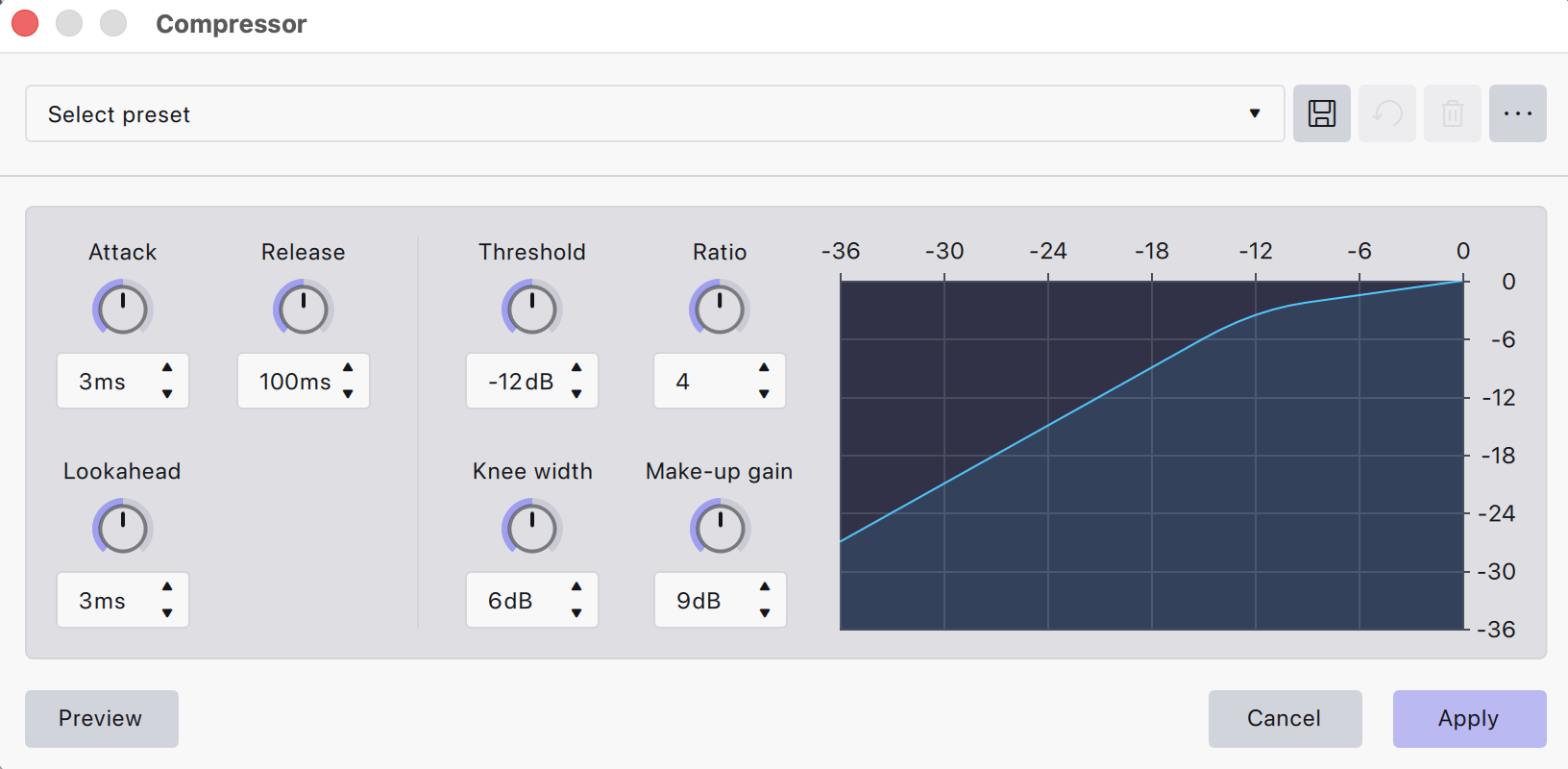
Audacity replaced its compressor. The guides still on page one describe Noise Floor and Decay Time, which are not on your screen any more. Here is what every one of the 27 factory presets actually does, which to pick for speech, and what to change when it still sounds wrong.
Audacity ships 27 compressor presets and names tell you almost nothing about what they do. These are the six that touch spoken word, with their actual values.
| Built-in preset | Threshold | Ratio | Knee | Attack | Release | Lookahead | Make-up |
|---|---|---|---|---|---|---|---|
| Podcast/RadioAudacity's own answer. A very wide 24 dB knee makes it gentle, but the 40 ms release is fast for speech and can breathe on a slow talker. | -15 | 3 | 24 | 15 | 40 | 1 | 1 |
| Vocal ControlNear-identical to Podcast/Radio on threshold and ratio, but with an instant attack and a 196 ms release. Smoother, and usually the better podcast choice of the two. | -15 | 3 | 23.5 | 0 | 196 | 1 | 4.5 |
| Vocal Touch-UpThe softest knee in the whole set at 30 dB, with a 450 ms release. Barely audible. Good on a voice that is already even. | -22 | 1.5 | 30 | 2 | 450 | 0 | 3.6 |
| Voice Memos BalancerA 10:1 ratio with a 3.6 ms release is a leveller, not a compressor. Built for phone and laptop recordings, and it will flatten a good mic. | -22.3 | 10.1 | 5.8 | 6.5 | 3.6 | 1 | 4.5 |
| Lead Vocals5.2:1 with a 1 ms attack. Made for sung vocals in a mix; on speech it clamps consonants and sounds lispy. | -14 | 5.2 | 5.5 | 1 | 60 | 1 | 0 |
| Gentle1.5:1 at -18 dB. Almost nothing happens. Useful as a light touch before a limiter. | -18 | 1.5 | 6 | 1 | 100 | 1 | 0 |
Threshold, knee and make-up in dB. Attack, release and lookahead in ms. Values read directly from Audacity 4's own preset definitions.
Podcast/Radio is one setting for five quite different jobs. These are the values we use instead, adjusted from it: slower releases where speech needs room to breathe, lower thresholds where the voice has to carry. Type them in, preview, then move threshold first — it is the control that decides how much compression you actually get.
| Use case | Threshold | Ratio | Attack | Release | Knee width | Lookahead | Make-up gain |
|---|---|---|---|---|---|---|---|
| Podcast hostClose mic, conversational, a guest on the other track | -18 dB | 3 : 1 | 10 ms | 150 ms | 9 dB | 5 ms | 6 dB |
| Voice-over readScripted, controlled delivery, corporate or explainer | -16 dB | 2.5 : 1 | 15 ms | 120 ms | 9 dB | 5 ms | 4 dB |
| Radio presenterLinks, back-announces, anything that has to cut through a car | -22 dB | 4 : 1 | 5 ms | 80 ms | 6 dB | 5 ms | 9 dB |
| Audiobook narrationLong-form, consistency matters more than impact | -18 dB | 3 : 1 | 20 ms | 200 ms | 12 dB | 5 ms | 5 dB |
| Station ID / imagingShort, loud, sits on top of a bed | -26 dB | 6 : 1 | 2 ms | 60 ms | 3 dB | 5 ms | 12 dB |
Lookahead is 5 ms throughout. It costs nothing and makes the compressor more accurate on speech transients.
A soft knee and a slow-ish release keep the compression inaudible, which is what you want on a voice people listen to for an hour. The 10 ms attack lets the front of each word through so consonants stay crisp.
A trained read is already even, so it needs less. Push the ratio past 3:1 here and you flatten the performance the voice artist was paid for.
Lower threshold and faster times push the voice forward and keep it there. This is the one that sounds like radio rather than like a recording of someone talking.
The widest knee in the table, because an audiobook is judged on nothing drawing attention to itself over nine hours. Slow release avoids pumping on long sentences.
Hard knee, fast everything. Imaging is supposed to be obviously processed — this is the one place where hearing the compressor is the point.
Seven controls and a transfer curve. If yours has Noise Floor and Decay Time instead, you have opened Legacy Compressor — see below.
The dropdown gives you names and nothing else. Here is what every factory preset actually sets, so you can pick one on evidence instead of on the word “Beefy”. Spoken-word presets are highlighted.
| Preset | Threshold | Ratio | Knee | Attack | Release | Lookahead | Make-up |
|---|---|---|---|---|---|---|---|
| Modern | -14 | 4 | 18 | 0.2 | 210 | 1 | 0 |
| Glue Compressor | -22 | 1.2 | 12 | 20 | 1000 | 1 | 2.5 |
| Gentle | -18 | 1.5 | 6 | 1 | 100 | 1 | 0 |
| Beat Booster | -18 | 4 | 1 | 14 | 9 | 1 | 3 |
| Deep Dive Master | -23.5 | 1.2 | 1 | 52.2 | 12.2 | 33.2 | 1.6 |
| Beefy Master | -16.8 | 1.2 | 4.9 | 49.6 | 17.9 | 100.0 | 2.5 |
| Make It Right Master | -6.5 | 1.4 | 1 | 1 | 1 | 10 | 1.6 |
| Brick Wall Master | -10 | 100 | 2 | 0 | 2 | 1 | 3 |
| Lead Vocals | -14 | 5.2 | 5.5 | 1 | 60 | 1 | 0 |
| Fat Vocals | -32 | 1.7 | 5 | 86.9 | 15.2 | 1 | 2.5 |
| Power Vocals | -16.8 | 1.5 | 19.6 | 2.8 | 356.3 | 46.2 | 3 |
| Vocal Control | -15 | 3 | 23.5 | 0 | 196 | 1 | 4.5 |
| Vocal Touch-Up | -22 | 1.5 | 30 | 2 | 450 | 0 | 3.6 |
| Voice Memos Balancer | -22.3 | 10.1 | 5.8 | 6.5 | 3.6 | 1 | 4.5 |
| Podcast/Radio | -15 | 3 | 24 | 15 | 40 | 1 | 1 |
| Piano | -16 | 2 | 18 | 0.2 | 150 | 1 | 1 |
| Acoustic Guitar | -15 | 2.5 | 8 | 15 | 225 | 1 | 1.5 |
| Bass Guitar | -13 | 3 | 2 | 1 | 50 | 40 | 0 |
| Strings | -15 | 1.8 | 14.3 | 30 | 400 | 1 | 2.5 |
| Kick Drums | -14 | 4 | 0.5 | 30 | 120 | 1 | 2 |
| Drums Control | -12 | 2 | 29 | 2 | 40 | 1 | 1 |
| Climax Impulser SFX | -55.1 | 23.4 | 27.4 | 172 | 813.4 | 0 | 0 |
| Engine Breathing SFX | -37.7 | 4.7 | 3.5 | 190.2 | 0.2 | 2.3 | 0 |
| Great Impact SFX | -49.3 | 24.6 | 5 | 172 | 562.6 | 0.6 | 8.3 |
| Great Body SFX | -32.8 | 2.4 | 0.3 | 74.6 | 204.8 | 29.3 | 8.6 |
| Great Tail SFX | -55.4 | 2.4 | 0.3 | 1.4 | 199.6 | 0 | 23.9 |
| Smack Explosion SFX | -32.5 | 5.9 | 24.4 | 155.5 | 1.7 | 1.3 | 7.1 |
Note the outliers: Brick Wall Master is a 100:1 ratio, which is a limiter wearing a compressor's clothes. The six SFX presets use thresholds down to −55 dB and are for sound design, not programme material.
In voice terms, not textbook terms.
| Control | Default | What it does to a voice |
|---|---|---|
| Threshold | -12 dB | The level where compression starts. Everything louder gets turned down; everything quieter is untouched. This is the control that actually decides how much compression you get, and it is the one that depends on how loud your recording already is. |
| Ratio | 4 | How hard it turns down what crosses the threshold. 3:1 means 3 dB over the threshold comes out as 1 dB over. Voice lives between 2:1 and 4:1. Above 6:1 you are limiting, not compressing. |
| Attack | 3 ms | How fast it reacts. Short attacks catch the transient at the front of a word and can make speech sound dull or lispy. 10–20 ms lets the consonant through and compresses the vowel behind it. |
| Release | 100 ms | How fast it lets go. Too short and you hear it breathing between words; too long and one loud word ducks the sentence after it. 100–200 ms suits speech. |
| Knee width | 6 dB | How gradually compression comes in around the threshold. A wide (soft) knee is gentler and harder to hear. For voice, wider is almost always better. |
| Lookahead | 3 ms | Lets the compressor see the peak coming so it is already moving when the peak arrives. New in this compressor — the Legacy one had no equivalent. A few ms is free accuracy; leave it at 5 ms. |
| Make-up gain | 9 dB | Puts back the level compression took away. Set it last, by ear, against the bypassed signal — or skip it and let a loudness normaliser do the job properly. |
Audacity still ships the old compressor as Legacy Compressor, and most tutorials online describe that one. Here is how the controls map, so an older guide is still usable.
| Legacy Compressor | Compressor | Notes |
|---|---|---|
| Threshold | Threshold | Same idea, same units. |
| Noise Floor | — (gone) | The old compressor ignored anything below this. There is no equivalent: use a noise gate before the compressor instead. |
| Ratio | Ratio | Same. |
| Attack Time | Attack | Same idea. The old one was in seconds on a slider, the new one in milliseconds. |
| Decay Time | Release | Renamed. Same job. |
| — (none) | Knee width | New. The old compressor had a fixed knee you could not change. |
| — (none) | Lookahead | New. |
| "Make-up gain for 0 dB after compressing" | Make-up gain | Was a checkbox that normalised to 0 dB. Now a gain control in dB, which is better — normalising every clip to 0 dB was never what you wanted. |
Use the current Compressor where you have the choice. Lookahead and an adjustable knee both matter on speech, and Legacy Compressor has neither.
Order matters more than any individual setting. Compression amplifies whatever you did not fix first.
Everything on this page — low cut, de-esser, compressor, voicing EQ, make-up gain and a peak ceiling — runs from one dropdown in Airchain Voice, using the same five voices as the table above. It is free, open source, and installs in about a minute.
Get the free Audacity plug-in packNo account, no email. GPL v2+, the same licence as Audacity.
It sets Threshold -15 dB, Ratio 3:1, Knee width 24 dB, Attack 15 ms, Release 40 ms, Lookahead 1 ms and Make-up gain 1 dB. The very wide knee makes it gentle and hard to hear, which is right for speech. The 40 ms release is on the fast side and can sound like it is breathing between words on a slow talker - lengthen it to 150 ms if you hear that.
Threshold -18 dB, Ratio 3:1, Attack 10 ms, Release 150 ms, Knee width 9 dB, Lookahead 5 ms, Make-up gain 6 dB. Normalise the clip to around -6 dB peak first, otherwise the threshold means nothing: a quiet recording will never reach it and a hot one will be crushed.
Because Audacity replaced it. The current Compressor has Threshold, Ratio, Attack, Release, Knee width, Lookahead and Make-up gain. The older one, still shipped as Legacy Compressor, had Threshold, Noise Floor, Ratio, Attack Time and Decay Time. Almost every guide written before the change describes the Legacy controls, so the names will not match what is on your screen.
Compressor. It has a lookahead and an adjustable knee, both of which matter on speech, and its make-up gain is a proper gain control rather than a normalise-to-0-dB checkbox. Legacy Compressor exists so old projects and old macros keep working.
Between 2:1 and 4:1. 2.5:1 for a controlled voice-over read, 3:1 for a podcast host, 4:1 for a radio presenter who needs to cut through. Past 6:1 you are limiting rather than compressing, which is a different job and belongs at the end of the chain.
After. Compression raises quiet material, so any hiss or room tone left in the recording comes up with the voice. Clean first, compress second, set loudness last.
Your attack is too short. At 3 ms the compressor clamps down on the consonant at the front of each word, which is where speech gets its clarity. Move it to 10–20 ms and the transient passes through before compression engages.
Yes. A compressor controls dynamics, not delivery level. Set your loudness last: -16 LUFS for a stereo podcast, -19 LUFS for mono, -23 LUFS for EBU R 128 broadcast.
Airchain Voice is a free Audacity plug-in that applies this whole chain — low cut, de-esser, compressor, voicing EQ, make-up gain and a peak ceiling — from one dropdown, with the same five voices used in the table on this page.
Turn your idea into a finished jingle, radio ID, or promo. Make one yourself in seconds with our AI Jingle Maker — or have a custom one handcrafted for you.